Hi all,
lately I've been getting this from time to time:
"can't read from source file or disk"
I'm in Win7 64 bit. It's happened to a couple of Photoshop files I was working on, now all of a sudden I can't open them anymore. Photoshop can't open because of a disk error. It also happened to a Photoshop brush I wanted to load. Maybe be coincidence but so far I've only noticed in when working with PS.
When I tro to move them to another disk I get the above error message.
I used "tools/error checking" utility that comes with windows and it found nothing wrong both in file system errors or searching for bad sectors.
So is there anything else I can do to recover the files? Any recovery software?
It's not such a big deal, I can redo the files so it's not an emergency I would want to spend a lot of money revering my files ...
Also should I think about replacing the disk?
Cheers
Chris
can't read from source file or disk - windows 7
-
KiLLerCloWn
- Senior Member
- Posts: 226
- Joined: Thu Nov 23, 2000 10:13 am
- Location: Seville/Spain
- Contact:
can't read from source file or disk - windows 7
<img src="http://www.paw-europe.com/clownanim.gif">
<a href="http://www.mameworld.net">MameWorld</a>
<a href="http://www.mameworld.net">MameWorld</a>

-
FlyingPenguin

- Flightless Bird
- Posts: 33161
- Joined: Wed Nov 22, 2000 11:13 am
- Location: Central Florida
- Contact:
Smells like weak sectors on the hard drive.
Check for loose or dirty SATA cable on HDD: Unplug both ends and reconnect to clean & reseat.
Check for loose or dirtyu RAM contacts: remove each RAM stick and then re-install to clean & re-seat.
Run Spinrite level 2 on the drive if you own it. Otherwise do a sector scan on the drive (right click drive in My Computer, properties, Tools, Check). This will take a while.
Free version of Active Disk Monitor will give you some idea of the condition of the drive: http://www.disk-monitor.com/
Hope this helps...
Check for loose or dirty SATA cable on HDD: Unplug both ends and reconnect to clean & reseat.
Check for loose or dirtyu RAM contacts: remove each RAM stick and then re-install to clean & re-seat.
Run Spinrite level 2 on the drive if you own it. Otherwise do a sector scan on the drive (right click drive in My Computer, properties, Tools, Check). This will take a while.
Free version of Active Disk Monitor will give you some idea of the condition of the drive: http://www.disk-monitor.com/
Hope this helps...
---
“The Government of Spain will not applaud those who set the world on fire just because they show up with a bucket.” - Prime Minister of Spain, Pedro Sánchez

“The Government of Spain will not applaud those who set the world on fire just because they show up with a bucket.” - Prime Minister of Spain, Pedro Sánchez
-
KiLLerCloWn
- Senior Member
- Posts: 226
- Joined: Thu Nov 23, 2000 10:13 am
- Location: Seville/Spain
- Contact:
Many thanks Penguin 
I cleaned and reset all the connections of the hardware, disk and ram.
I ran sector scan and file system scan which did not detect any problems.
Active Disc Monitor shows the following attached:
http://lemon-digital.com/temp/disk.gif
The only thing remaining would be to get a version of Spinrite. However that costs as much as getting a new disk some wondering if it's worth my while?
Thanks again
Chris
I cleaned and reset all the connections of the hardware, disk and ram.
I ran sector scan and file system scan which did not detect any problems.
Active Disc Monitor shows the following attached:
http://lemon-digital.com/temp/disk.gif
The only thing remaining would be to get a version of Spinrite. However that costs as much as getting a new disk some wondering if it's worth my while?
Thanks again
Chris
<img src="http://www.paw-europe.com/clownanim.gif">
<a href="http://www.mameworld.net">MameWorld</a>
<a href="http://www.mameworld.net">MameWorld</a>
-
FlyingPenguin
- Flightless Bird
- Posts: 33161
- Joined: Wed Nov 22, 2000 11:13 am
- Location: Central Florida
- Contact:
About the only value of any real use in the SMART data displayed in Active Disk Monitor is the "Reallocated sector count" (it's called "Relocated Sectors" in Spinrite's SMART display). Spinrite doesn't show it as a percentage, just as the normal number available versus the current number (190 out of 190 in the screenshot below). When this gets under 55% or so, Spinrite highlights it in red. Not sure what the threshold is in Active Disk Monitor. Your drive is getting pretty close to that number which is why Active Disk Monitor is rating it's status at 64%.
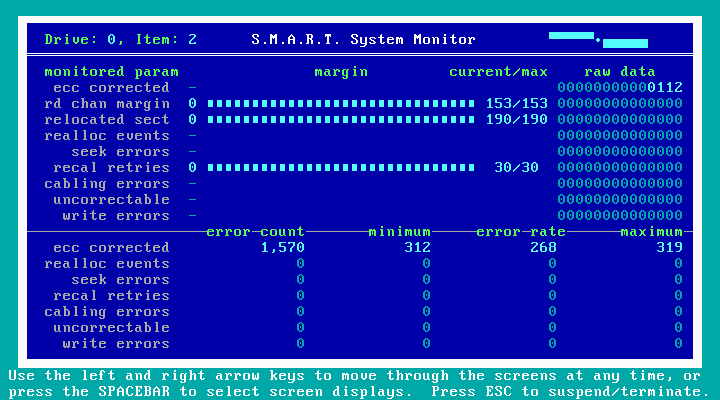
One of the nice things about Spinrite is that it shows you the SMART data while at the same time forcing the drive to read every single sector (exercising the drive). However you basically did the same thing by doing a sector scan.
When a sector becomes nearly unreadable, the drive's internal controller reallocates it (swaps it out for a spare). Ideally you don't want to see any reallocated sectors. If a drive is reallocating a lot of sectors, like yours is, it's an indicator that the drive is failing.
I can't be 100% sure that's the sole cause of your problems, but that Reallocated sector count looks awful, and I personally wouldn't trust a drive that looks like that.
Only thing Spinrite would do for that drive is extend it's life a bit by running a level 4 scan which is like a sector scan except that instead of just reading every sector it reads, inverts the bits, writes, inverts the bits, and re-writes each sector. This strengthens the signal of each bit recorded on the platters. It usually takes a long time on a modern drive (18 - 24 hours or more).
However, from the look of that data you would still have a drive whose days are numbered. Better to take the money you would spend on Spinrite and just replace the drive.
If this drive is under warranty it would be worth RMAing it. Otherwise, I usually use these kinds of questionable drives for archiving redundant data. I have a whole safe deposit box full of questionable drives with redundant data backups on them.
You may be able to clone that drive to a new drive and everything may be hunky dory. I suspect you're getting sector read timeouts right now which is causing the file system errors you're getting.
There is also a chance that some files will be corrupt when you clone them, but I have had very good luck cloning questionable drives. Error correction on hard drives is quite robust nowadays.
I bet that drive is also slowing your system down a lot. It's spending a lot of time waiting for sector read timeouts.
Hope this helps.
One of the nice things about Spinrite is that it shows you the SMART data while at the same time forcing the drive to read every single sector (exercising the drive). However you basically did the same thing by doing a sector scan.
When a sector becomes nearly unreadable, the drive's internal controller reallocates it (swaps it out for a spare). Ideally you don't want to see any reallocated sectors. If a drive is reallocating a lot of sectors, like yours is, it's an indicator that the drive is failing.
I can't be 100% sure that's the sole cause of your problems, but that Reallocated sector count looks awful, and I personally wouldn't trust a drive that looks like that.
Only thing Spinrite would do for that drive is extend it's life a bit by running a level 4 scan which is like a sector scan except that instead of just reading every sector it reads, inverts the bits, writes, inverts the bits, and re-writes each sector. This strengthens the signal of each bit recorded on the platters. It usually takes a long time on a modern drive (18 - 24 hours or more).
However, from the look of that data you would still have a drive whose days are numbered. Better to take the money you would spend on Spinrite and just replace the drive.
If this drive is under warranty it would be worth RMAing it. Otherwise, I usually use these kinds of questionable drives for archiving redundant data. I have a whole safe deposit box full of questionable drives with redundant data backups on them.
You may be able to clone that drive to a new drive and everything may be hunky dory. I suspect you're getting sector read timeouts right now which is causing the file system errors you're getting.
There is also a chance that some files will be corrupt when you clone them, but I have had very good luck cloning questionable drives. Error correction on hard drives is quite robust nowadays.
I bet that drive is also slowing your system down a lot. It's spending a lot of time waiting for sector read timeouts.
Hope this helps.
---
“The Government of Spain will not applaud those who set the world on fire just because they show up with a bucket.” - Prime Minister of Spain, Pedro Sánchez
“The Government of Spain will not applaud those who set the world on fire just because they show up with a bucket.” - Prime Minister of Spain, Pedro Sánchez


Agreed, that number is quite high. if it is reallocating sectors that normally indicates a physical problem and nothing to do with a cable.
Seems you aren't the first one with that particular model either:
http://forums.seagate.com/t5/Barracuda- ... td-p/71142
It isn't the only concern either, as it is picking up other things as well which are a sign of a failing drive. I wouldn't be surprised if you haven't noticed it running a little sluggish lately. I'd save what you can and schedule a RMA if under warranty still. You can still attempt the clone, but I would still save the important stuff and verify it before anything. The clone is going to work the drive a little bit, and I have seen failing drives completely fail during the process.
Seems you aren't the first one with that particular model either:
http://forums.seagate.com/t5/Barracuda- ... td-p/71142
It isn't the only concern either, as it is picking up other things as well which are a sign of a failing drive. I wouldn't be surprised if you haven't noticed it running a little sluggish lately. I'd save what you can and schedule a RMA if under warranty still. You can still attempt the clone, but I would still save the important stuff and verify it before anything. The clone is going to work the drive a little bit, and I have seen failing drives completely fail during the process.
When all else fails, replace the user.
-
KiLLerCloWn
- Senior Member
- Posts: 226
- Joined: Thu Nov 23, 2000 10:13 am
- Location: Seville/Spain
- Contact:
Thanks very much guys!
I have most of the really important stuff backed up in any case. So I will just try a clone and replace operation.
It's a bit of a pain as my entire Windows installation is on this drive, so I guess I will have to spend a day sorting it out - which is a days work lost for me. Still better than losing it all though
Thanks again
Chris
I have most of the really important stuff backed up in any case. So I will just try a clone and replace operation.
It's a bit of a pain as my entire Windows installation is on this drive, so I guess I will have to spend a day sorting it out - which is a days work lost for me. Still better than losing it all though
Thanks again
Chris
<img src="http://www.paw-europe.com/clownanim.gif">
<a href="http://www.mameworld.net">MameWorld</a>
<a href="http://www.mameworld.net">MameWorld</a>
-
KiLLerCloWn
- Senior Member
- Posts: 226
- Joined: Thu Nov 23, 2000 10:13 am
- Location: Seville/Spain
- Contact:
-
FlyingPenguin
- Flightless Bird
- Posts: 33161
- Joined: Wed Nov 22, 2000 11:13 am
- Location: Central Florida
- Contact:
I'm using Acronis True Image home 2012. Been very reliable and it aligns partitions properly for SSDs.
Some new drives will come with some kind of cloning app as well.
Some new drives will come with some kind of cloning app as well.
---
“The Government of Spain will not applaud those who set the world on fire just because they show up with a bucket.” - Prime Minister of Spain, Pedro Sánchez
“The Government of Spain will not applaud those who set the world on fire just because they show up with a bucket.” - Prime Minister of Spain, Pedro Sánchez
-
KiLLerCloWn
- Senior Member
- Posts: 226
- Joined: Thu Nov 23, 2000 10:13 am
- Location: Seville/Spain
- Contact:
-
KiLLerCloWn
- Senior Member
- Posts: 226
- Joined: Thu Nov 23, 2000 10:13 am
- Location: Seville/Spain
- Contact:
That's good to know, thanks Zyfer
I haven't had time to get down to it yet, too much work - just praying it will hold out for another couple of days. I'm saving everything to an external USB drive just in case
C.
I haven't had time to get down to it yet, too much work - just praying it will hold out for another couple of days. I'm saving everything to an external USB drive just in case
C.
<img src="http://www.paw-europe.com/clownanim.gif">
<a href="http://www.mameworld.net">MameWorld</a>
<a href="http://www.mameworld.net">MameWorld</a>