
OK, this problem has been around for a while and I've ignored it for too long, so I'm going to finally try to solve this! Here goes the story:
Last spring I upgraded my video card and memory, I got a GTX 280 and went from 2 to 4 GB memory. Now I didn't realize at the time that the 280 was such a power pig and required a special power plug that I didn't have at the time. I could run it, but it said only do it temporarily. My mistake was not getting a new PSU right away, and a few days later my comp started rebooting all the time, so I pretty much knew that my PSU wasn't cutting it, so I went and got a new PSU and everything seemed OK. It ran for weeks just fine. Then this new problem creeped up. I can warm boot as much as I want and it won't do it, but if I ever have to cold boot (power down), it'll restart just fine and load Windows, but then for the next day or so it will randomly reboot a few times, then won't ever do it again unless I ever have to power down again, which I always dread now. There's no BSOD or anything, it just shuts off and restarts. This problem makes no sense to me at all! I have run it for weeks in a row with no reboots!
I know it's not OS related, because I made a dual-boot into a fresh install of Vista a ways back and it still did it, so it rules that out. Anyway, like I said, it can run months just fine, until I have to power down. Another thing of note is I realized my 'reset' button doesn't work for some reason, I wonder if that has something to do with it. Only way for me to cold boot is to flip the PSU switch or hold down the power button for 5 seconds.
Anyone have any ideas what's causing this? This weekend I'm planning on opening her up and taking everything apart and checking for loose connections, and check why the 'reset' button doesn't work, but if that doesn't help it looks like I'm going to have to spend some money replacing parts, hope it's not the mobo but it looks like it is?
computer randomly reboots a few times after cold boot?
-
FlyingPenguin

- Flightless Bird
- Posts: 33161
- Joined: Wed Nov 22, 2000 11:13 am
- Location: Central Florida
- Contact:
3 possibilities I can think of:
1) Bad UPS battery backup
2) Bad PSU
3) Bad mobo
This is almost classic bad capacitor behavior so check the mobo for swollen or leaking caps.
Could be that the mobo was damaged by the old PSU.
Could be the new PSU is a lemon.
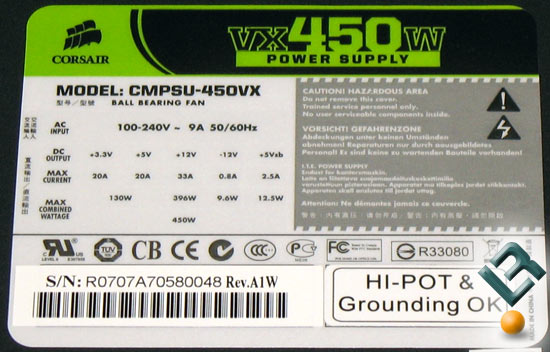
What's the brand an model of the new PSU?
1) Bad UPS battery backup
2) Bad PSU
3) Bad mobo
This is almost classic bad capacitor behavior so check the mobo for swollen or leaking caps.
Could be that the mobo was damaged by the old PSU.
Could be the new PSU is a lemon.
What's the brand an model of the new PSU?
---
“The Government of Spain will not applaud those who set the world on fire just because they show up with a bucket.” - Prime Minister of Spain, Pedro Sánchez

“The Government of Spain will not applaud those who set the world on fire just because they show up with a bucket.” - Prime Minister of Spain, Pedro Sánchez
I'm at work but I can check the PSU when I get home. You're probably right about the capacitors, because what gets me is that it's fine after a day of random reboots, so I'm thinking that it's getting a funky voltage until it finally stabilizes... does that make sense? Can a capacitor be replaced or am I going to need a whole new mobo? If that's the case I'm in for an expensive upgrade... 


-
FlyingPenguin
- Flightless Bird
- Posts: 33161
- Joined: Wed Nov 22, 2000 11:13 am
- Location: Central Florida
- Contact:
-
FlyingPenguin
- Flightless Bird
- Posts: 33161
- Joined: Wed Nov 22, 2000 11:13 am
- Location: Central Florida
- Contact:
Sounds like a decent PSU unless it's a lemon.
Bad caps on the mobo or in the PSU will cause you to have trouble powering up the PC. Once it does boot up however it generally keeps running fine until the next time you reboot.
Bad caps on the mobo or in the PSU will cause you to have trouble powering up the PC. Once it does boot up however it generally keeps running fine until the next time you reboot.
---
“The Government of Spain will not applaud those who set the world on fire just because they show up with a bucket.” - Prime Minister of Spain, Pedro Sánchez
“The Government of Spain will not applaud those who set the world on fire just because they show up with a bucket.” - Prime Minister of Spain, Pedro Sánchez
-
FlyingPenguin
- Flightless Bird
- Posts: 33161
- Joined: Wed Nov 22, 2000 11:13 am
- Location: Central Florida
- Contact:
You checked the caps on the mobo?
The only real way to diagnose this is to connect another power supply and see if the problem persists. If it does then it's a mobo issue.
If you don't have access to a spare PSU then yeah, see if a mom & pop shop is willing to burn it in with another PSU connected then see what happens.
The only real way to diagnose this is to connect another power supply and see if the problem persists. If it does then it's a mobo issue.
If you don't have access to a spare PSU then yeah, see if a mom & pop shop is willing to burn it in with another PSU connected then see what happens.
---
“The Government of Spain will not applaud those who set the world on fire just because they show up with a bucket.” - Prime Minister of Spain, Pedro Sánchez
“The Government of Spain will not applaud those who set the world on fire just because they show up with a bucket.” - Prime Minister of Spain, Pedro Sánchez
-
NubyCanuby_OFC

- Posts: 636
- Joined: Sat Dec 10, 2005 12:59 am
- Location: South Surrey, BC, Canada
- Contact: