Page 1 of 1
Couple Noob Questions
Posted: Mon Sep 19, 2005 5:55 pm
by ZiRu$
Ugh, i'm trying to network 10 PC's to a 16-port switch. This would be no problem if they were all XP but i forgot how to use ME and 98.
First, for switches do i use crossover or straight through?
Second, i got all the computers talking to each other (shared documents). But how to i get them to have the internet??? the internet is directly plugged into the switch (DSL) and so is all computers. Could someone help, i spent hours frusterating myself today. I gotta go back tommorrow or wednesday to finish the job.
Please help me.
Posted: Mon Sep 19, 2005 6:45 pm
by b-man1
many newer switches (or any hub/router/switch, etc) auto detect and adjust for a crossover or standard lan cable...but you should use a standard if possible (that will work for sure).
you did not mention a router...so if you are connecting a DSL modem WITHOUT a built-in DHCP server then you will run into problems. each pc on the switch will try to get a unique IP from your ISP and your ISP will say "nope".
my DSL modem has a built-in 4 port switch and DHCP server (yours probably has at least the DHCP server) and then it will allocate IP addresses to each pc you connect to the switch and you are good to go.
you can check that in WinME/98 by clicking on START --> RUN ...then type in WINIPCFG and check out the IP address. a 192.x.x.x or similar is good...a 169.x.x.x is not and the pc will not get online.
http://www.practicallynetworked.com/sup ... nipcfg.htm

Posted: Mon Sep 19, 2005 7:19 pm
by FlyingPenguin
Are you using DHCP (allows the computers to automatically aquire an IP address) or using static IPs (configured them yourself)? You should have a router sharing the DSL connection and it should have a DHCP server. The computers will all configure themselves properly and get net access.
If you already set it up the IPs manually (static IP) then you need to manually configure the gateway and DNS server on every computer.
Do you have a router connected to your switch or just a DSL modem? You can't share a modem without a router. Most DSL ISPs give you a combination router/modem. If you're using a PPPOE client to access the Internet (looks like a dialup with a logon) then you have a modem and not a modem/router. You need to install a DSL/Cable Router between the modem and the switch, and configure the router to logon automatically using PPPOE.
Posted: Wed Sep 21, 2005 12:11 am
by ZiRu$
It's this switch (Trendnet TE100-S16Eplus)
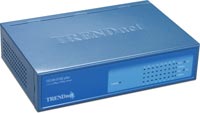
And the DSL modem is plugged DIRECTLY into the switch. There is
NO router.
So what you're saying is this is NOT possible? It will not work?
On the site it shows this diagram:
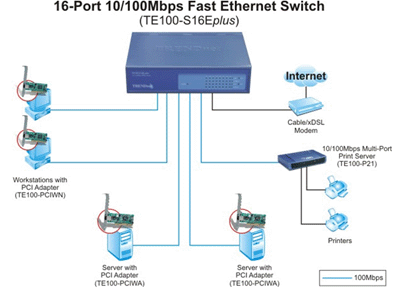
That shows it being directly plugged in.
Posted: Wed Sep 21, 2005 12:27 am
by DoPeY5007
The way you have it plugged in, only one PC will get the internet, the 1st PC that boots up
That is unless your ISP gives you 10 IP addresses.
You need to get a router to bo between the switch and the DSL
Posted: Wed Sep 21, 2005 6:19 am
by FlyingPenguin
Depends. Is your DSL Modem a Router/Modem? If so then the way you have it setup will work. If it's just a modem it won't work and you need a router.
Posted: Wed Sep 21, 2005 6:28 am
by b-man1
i looked that switch up and it just looks like a standard auto-sensing 10/100 switch...so no DHCP server. you would need to use ICS on one pc to make it all work...but i would rather pay $20-$40 and get a cheap router instead.

Posted: Wed Sep 21, 2005 8:17 am
by DoPeY5007
Originally posted by b-man1
i looked that switch up and it just looks like a standard auto-sensing 10/100 switch...so no DHCP server. you would need to use ICS on one pc to make it all work...but i would rather pay $20-$40 and get a cheap router instead.
you can't use ICS with some PPPoE DSL connections.
Posted: Wed Sep 21, 2005 8:23 am
by wvjohn
what the others have said about needing a router to do the DHCP function + most modern routers have a hardware firewall that provides a lot of protection, especially if you have multiple pc's with users who may or may not keep stuff updated - you can get a decent one for ~$40 and i would highly recommend it