

The problem I have with ALL flash drives is that they are not really designed to be attached to a keychain. Most have very weak anchor points for the keychain that breaks, and I have a big problem with the fact that most flash drives are designed so that you have to plug them in with all the weight of your keychain hanging off of them.
One great exception that I found many years ago is the Lexar JumpDrive Sport. I have carried one on my keychain for 4 or 5 years and IMO this was the BEST keychain flash drive ever. It's very rugged, water tight, can actually be used as a keychain fob without breaking it and it doesn't feel uncomfortable in your pocket because it's mounted in a rubber holder that flexes instead of letting the stick poke you. Best of all you can't lose the cap because there is no cap - the rubber holder acts as the cap.
Unfortunately Lexar JumpDrives are no longer made and were never made larger than 1Gb.
JumpDrive Sport in it's rubber keychain holder:

JumpDrive Sport removed from it's rubber keychain holder:

The Lexar JumpDrive was a brilliant design. The flash drive can be removed from a rubber holder that stays attached to your key chain so you don't need to plug the flash drive in with your entire (and in my case, very large) keychain attached. The rubber holder is VERY strong. I almost always yank my keys out of my pocket by tugging on the flash drive. I swing my keys around by the flash drive all the time.
Once inside it's rubber holder it is VERY strongly anchored and will not come out without some serious finger pushing in the right place - especially when the rubber is new. It's hard to see in the photos but there's a "U" channel around the case that the rubber locks into, and it's very tight and also completely water tight.
I keep a few encrypted personal files, client passwords and all my diagnostic tools on my JumpDrive Sport. It's great to be able to remove the flash drive completely from the keychain, but I never lose the flash drive because it's quite obvious when I get back in the car and start the ignition if I've forgotten the drive and left it in the client's PC. That empty rubber holder is quite obvious.
I own three of the Lexar Jumpdrive Sports and have 4 spare rubber holders (the rubber rarely breaks but I have broken 2 in the past 4 years and I bought a 6 pack of replacement rubber holders from Lexar 4 years ago worrying that they were going to break more often). All three of my JumpDrive Sports are wearing out and one is 512Mb and the other two only 1 Gb which just doesn't cut it anymore. I can barely fit my most basic collection of tools on it nowadays. Also one of the 1Gb drives has developed bad memory areas and gives me errors when trying to sync it.
I started looking for a good replacement for my venerable JumpDrive Sport and found NOTHING! There is nothing out there that is even remotely as well designed and convenient to use as a keychain fob drive IMO. The best alternative I found was the Corsair Flash Voyager but it's far from perfect:
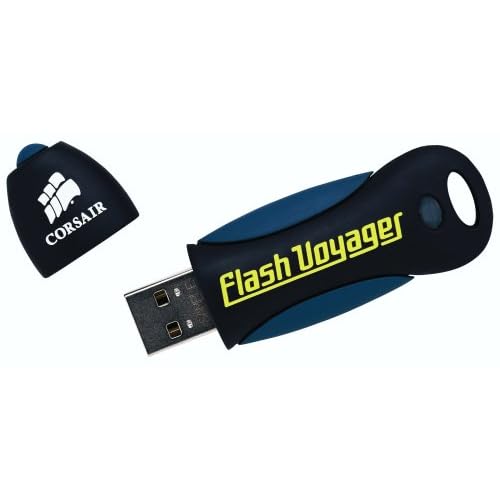
I have a 32Gb version I use for another application and I found it to be very rugged and very fast. Unfortunately - like most flash drives - it's ill suited to use as a keychain fob because the whole drive attaches to the keychain (requiring you to plug it in with the keychain attached) and the cap is easily lost. Also it's fatter than a normal flash drive which means you usually can't insert it into a USB port if there's something plugged into the adjacent port. However they are very robust and water proof being sealed inside a big rubber blob that serves as the case. This rubber case also makes them easy to cut open, and I had a plan...
I bought two new 16 Gb Voyagers (they're on sale with a rebate from NewEgg) and decided to hack them by cutting them out of their rubber cases and transplanting them into my old Lexar JumpDrive cases which are easy to crack open and seal back together again. I've opened them many times to re-solder the USB connector when I've accidentally bent it and cracked a solder joint.
I got lucky in that the circuit board for the Voyager is exactly the same size as the one for the JumpDrive. Even the LED was located in the same place. Probably not really luck - I bet these things are manufactured on a common PC board size for standardization. The guts of the Voyager is a bit bulkier because it has two large flash memory chips on the PC board instead of the one on the JumpDrive, so a little modding was required to make it fit. There were molded stanchions in the case that were in the way of the large memory chip on the top of the PC board.
A little relaxing music, a glass of wine, some patience with a small pair of side-cutters and an x-acto knife and I got the Voyager PC board to fit comfortably inside the JumpDrive case.
So now I have two 16Gb pseudo-JumpDrives. Below is shown (top to bottom) the original PC board from a JumpDrive, the modded case with the new Voyager PC board installed and ready to by glued shut with a thin layer of water viscosity professional grade Cyanoacrylate glue (expensive thin superglue, but I use this stuff on my model airplanes so I have it around). At the bottom of the photo is the freshly sealed drive with the new guts in it. The bumps on the edges are from prying it open with a flathead screwdriver, but I sanded those down when I finished.



 mile
mile 