Page 1 of 1

What should Device Manager show for SATA drives?

Posted: Thu May 25, 2006 8:36 pm
by Mike89
I just got done installing my two SATA drives.


I don't have anything that says SATA in Device Manager. Am I supposed to?

Under "IDE ATA/ATAPI controllers" I have.

Primary IDE Channel
Primary IDE Channel
Secondary IDE Channel
Standard Dual Channel PCI IDE Controller

First one, nothing is listed under either of the 2 in Advanced.

Second one, I assume is the 1st SATA drive listed as DMA 6 for the 1st entry in Advanced and nothing in the 2nd entry in Advanced.

Third one, nothing is listed under either of the 2 in Advanced.

Fourth one I assume is 2nd SATA drive also listed as DMA 6 for the 1st entry in Advanced and nothing in the 2nd entry of Advanced.

Fifth and sixth ones just say working properly.

All of them have Microsoft listed as drivers (original 2001).

Shouldn't there be some newer drivers listed somewhere there? And not from Microsoft?

Posted: Thu May 25, 2006 8:57 pm
by FlyingPenguin
SATA controllers don't show up under IDE/ATAPI controllers. They usually show up under "SCSI and RAID controllers", but every mobo is different.

If they're working in Windows then don't sweat it.

Posted: Thu May 25, 2006 9:52 pm
by Mike89
Nope, don't have any SCSI or RAID entries.

I just want to make sure I'm getting all the performance it's capable of and I'm not bottlenecking it because of something I may not have set right.

I ran the softsandra info and it doesn't list these drives as SATA. It lists them as ATA. I'm wondering if Windows is using the wrong drivers or something.

Posted: Fri May 26, 2006 5:35 am
by FlyingPenguin
No, different mobos just treat them differently. They probably are those two DMA 6 devices you found. There is no DMA6 in IDE. UDMA6 is sometimes used to describe SATA access speeds although it's technically incorrect.

There is no settings to change for SATA. Unlike IDE you can't throttle back the DMA mode on a SATA drive.

Posted: Fri May 26, 2006 9:39 am
by Mike89
It seems to be working fine. I do notice my system is speedier now than it was with my old hard drives.

I ran the HD Tach test and it got somewhere around 175 for burst speed. It's above the DMA6 and ATA150 in the graph so I guess that's not bad.

It's my first experience with SATA drives and I guess I was expecting to see the word "SATA" in the Device Manager.

With the Nvidia N4 drivers 6.70, there is a folder called IDE SATA (and another one called SATA RAID). Just for the heck of it I chose that Primary Drive under the ATA Controllers section of Device Manager and chose Update Drivers. I then pointed it to that IDE SATA folder and it selected the .inf there. I then saw in Device Manager two entries for supported devices. "Nvidia SATA controller" and Nvidia SATA Intel Controller. I chose the first one and then got a message saying Windows did not recommed installing these drivers because it could not verify compatibility and that the system could stop responding if I installed them. Needless to say I chickened out and cancelled out of the install. Dunno what was up there.

Posted: Fri May 26, 2006 5:00 pm
by FlyingPenguin
You don't need the RAID drivers unless you plan on using RAID.

You're fine the way you are. Be happy.

Posted: Fri May 26, 2006 5:19 pm
by Jim Z
SATA controllers don't show up under IDE/ATAPI controllers. They usually show up under "SCSI and RAID controllers", but every mobo is different.
The SATA ports in Intel and nvidia chipsets are "native" so they look to the OS like regular ATA controllers.

Posted: Mon May 29, 2006 10:25 am
by Mike89
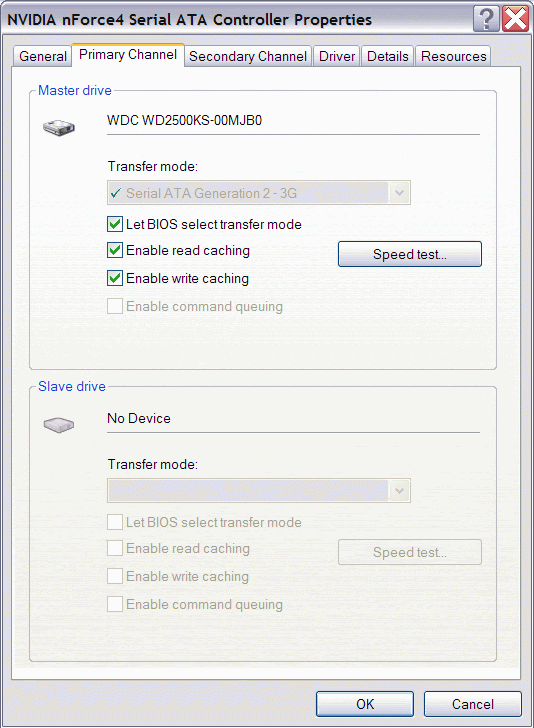
Finally figured out how to install the Nvidia SATA Drivers.

Image

Image

Image